Sunday, February 15, 2015
New Site
I just created a new site that you can find here. I'm not going to be updating this site but I will keep it up. My new site will have sims gameplay and cc finds.

Saturday, August 9, 2014
Quick Update 8/9/14
I've taken a break from the site for a while so that I could focus on
machinima and making custom content of my own. I'm not sure if I'll
upload all of it since it's kind of crappy, but if I do it won't be on
this site. Also, I'm going to have a creator of the week and show off
some of their uploads.
Wednesday, July 23, 2014
Anva's Fickle Eyes+ Defaults By Saanst
From Garden Of Shadows. By Anva. Download here.
I don't have the time to wait on MTS2 approval process I decided to upload them here! They've been sitting around for quite awhile. Enjoy!!


Defaults by Saanst. Download here. They're at the bottom of the post.

I don't have the time to wait on MTS2 approval process I decided to upload them here! They've been sitting around for quite awhile. Enjoy!!
Defaults by Saanst. Download here. They're at the bottom of the post.
Lastly, Anva's Fickle Eyes
defaulted, because I love them so much. People have defaulted these
before, but I could only find dead links, so I did them myself for
personal use. And since I'm dumping CC, why not share these, too? (I
also defaulted some Mouseyblue skins for personal use, but of course I
didn't stray from my Anva defaults for too long, but I don't think I'll
share those unless anybody is really interested.)
Brown: Cool brown
Dark blue: Sapphire
Light blue: Powder blue
Gray: Ice grey
Green: Jungle green
Brown: Cool brown
Dark blue: Sapphire
Light blue: Powder blue
Gray: Ice grey
Green: Jungle green
Friday, June 27, 2014
Million Dollar Mansion-one of a kind
From Mod The Sims. By losonogo. Download here.
A good day to u all
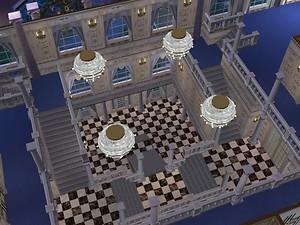
I unveil to u, ladies and gentlemen, the mansion to house those with a wealth of disposible income.
The Millionaire Mansion was built in c.1756 during the english enlightenment and has ever since been the most sort after property throughout the sim world.
At the rounded sum of $1,000,000 it is well inline with political, celebrity and bagman coffers, not to mention cheaters with excited fingers!!
Stately rooms include:
6 bedrooms, 7 bathrooms, kitchen, formal dining and lounge rooms, den, play and ballrooms, Grand Staircase,
poolside bar (indoors), large pool, outdoor entertaining patio and shop space for the exclusive clientelle!
The 5x6 lot estate is expertly landscaped conforming to the traditional rules of formal horticulture, with room to add a more personal touch.
In addition the house comes with select wallpapers, flooring and furniture to maintain exclusitivity.
Extensive wall and flooring collections: Sherlock, Alicia, serenity, romanticwall, tigris, T006, delft, casa-marbella, bastogne, vineyard and bristol
Created by Lady Komo Sims and can be found here at www.komosims.com
Window, Door and Curtain creations: Le Petit Trianon and Versailles ranges
by the talented Sir Sim Nuts at http://www.modthesims2.com/showthread.php?t=146562
Column recolours by michaela at http://www.modthesims2.com/showthread.php?t=109309
The Chateau paneling and brickwork styles under the superior direction of Tolli
and can be seen on display at www.simgedoehns.de
The extroadinary propagating of yuccas, hostas and Hydrangeas done by the creaters at www.4eversimfantasy.eu.tf, thank you.
The equal stars of the landscaping project are the creators at www.aussietopenders-sims2.com their pots of giant oleanders and literal roses are something else.
And also jendea for the amazing collection of rocks moved with her own two hands at www.jendea2.jendea.net
Not to mention the grand cypressus planted by franky from http://www.modthesims2.com/showthread.php?t=123016, amazing creativity dont you think?
Also rotadendrons by Madam Mickyss at http://www.modthesims2.com/member.php?u=94426, they are my favorite plant you know!
Lastly to the lighting specialists, loverat at http://www.modthesims2.com/member.php?u=99, those at http://www.meshkiste.de/ and BiestHB athttp://www.modthesims2.com/member.php?u=167323 whose chandelier creations are quite out of this workld thank you.
With all but a sincere farewell and happy simming this is all from me, Lord losonogo, and remember a thank you (on the left hand side) wouldn't go astray!!
 update:
i have made a version which plays better in the game and is alot
cheaper and also not as much cc. I will upload it if i get enough demand
for it.
update:
i have made a version which plays better in the game and is alot
cheaper and also not as much cc. I will upload it if i get enough demand
for it.
Update 29 Aug 2006: if u havent gathered by now im not the most
organised person on earth and have abandoned my simming commitments
badly!
Due to the busy and messy nature of my student life right now, it looks like i wont get around to building until a whole 5 weeks time, in my college break.
That means the millionares mansion version 2.0 wont be done until then. I know i said i would do it ages ago but work comes before games, sorry.
I will try and create a clean version and less complicated so its more playable. If u have content u wish for me to include because it will look better, post a comment and I will consider it along with a link.
Will update u guys soon
Losonogo
P.S thanx for all your support too it does make me feel good to know u enjoy my lots (when they work!)
Update 29th Nov 2006
Hi again MTS2 fans
I have finished college i cant believe my luck! This means mansion rebuild time!!!!!! I have to download my own work in order to edit it lol
The new version is done and have uploaded it, i hope it works better than the last, there was less game lag with this version.
The differences between the homes are three levels have been removed thus small stair cases have been removed also, a driveway is now included and the main door is a vast improvement.... oh and also fountains have been reduced as it slows the game down to much.
The price is also reduced to around $400,000 ...hey u still gotta be rich to live in this house!!
If you want to make this house work faster and cost less, its advisable to rid of some the plants!!
 The photo is titled newer version if u want to compare :p
There is new content for the newer version
Le Petit Trianon Window by simnuts101
Georgian Entry Door by phoenix_phaerie
Invisible Driveway by roddyalexio
Thank your for your patience
Losonogo


A good day to u all
I unveil to u, ladies and gentlemen, the mansion to house those with a wealth of disposible income.
The Millionaire Mansion was built in c.1756 during the english enlightenment and has ever since been the most sort after property throughout the sim world.
At the rounded sum of $1,000,000 it is well inline with political, celebrity and bagman coffers, not to mention cheaters with excited fingers!!
Stately rooms include:
6 bedrooms, 7 bathrooms, kitchen, formal dining and lounge rooms, den, play and ballrooms, Grand Staircase,
poolside bar (indoors), large pool, outdoor entertaining patio and shop space for the exclusive clientelle!
The 5x6 lot estate is expertly landscaped conforming to the traditional rules of formal horticulture, with room to add a more personal touch.
In addition the house comes with select wallpapers, flooring and furniture to maintain exclusitivity.
Extensive wall and flooring collections: Sherlock, Alicia, serenity, romanticwall, tigris, T006, delft, casa-marbella, bastogne, vineyard and bristol
Created by Lady Komo Sims and can be found here at www.komosims.com
Window, Door and Curtain creations: Le Petit Trianon and Versailles ranges
by the talented Sir Sim Nuts at http://www.modthesims2.com/showthread.php?t=146562
Column recolours by michaela at http://www.modthesims2.com/showthread.php?t=109309
The Chateau paneling and brickwork styles under the superior direction of Tolli
and can be seen on display at www.simgedoehns.de
The extroadinary propagating of yuccas, hostas and Hydrangeas done by the creaters at www.4eversimfantasy.eu.tf, thank you.
The equal stars of the landscaping project are the creators at www.aussietopenders-sims2.com their pots of giant oleanders and literal roses are something else.
And also jendea for the amazing collection of rocks moved with her own two hands at www.jendea2.jendea.net
Not to mention the grand cypressus planted by franky from http://www.modthesims2.com/showthread.php?t=123016, amazing creativity dont you think?
Also rotadendrons by Madam Mickyss at http://www.modthesims2.com/member.php?u=94426, they are my favorite plant you know!
Lastly to the lighting specialists, loverat at http://www.modthesims2.com/member.php?u=99, those at http://www.meshkiste.de/ and BiestHB athttp://www.modthesims2.com/member.php?u=167323 whose chandelier creations are quite out of this workld thank you.
With all but a sincere farewell and happy simming this is all from me, Lord losonogo, and remember a thank you (on the left hand side) wouldn't go astray!!
update:
i have made a version which plays better in the game and is alot
cheaper and also not as much cc. I will upload it if i get enough demand
for it.
Update 29 Aug 2006: if u havent gathered by now im not the most
organised person on earth and have abandoned my simming commitments
badly!Due to the busy and messy nature of my student life right now, it looks like i wont get around to building until a whole 5 weeks time, in my college break.
That means the millionares mansion version 2.0 wont be done until then. I know i said i would do it ages ago but work comes before games, sorry.
I will try and create a clean version and less complicated so its more playable. If u have content u wish for me to include because it will look better, post a comment and I will consider it along with a link.
Will update u guys soon
Losonogo
P.S thanx for all your support too it does make me feel good to know u enjoy my lots (when they work!)
Update 29th Nov 2006 Hi again MTS2 fans
I have finished college i cant believe my luck! This means mansion rebuild time!!!!!! I have to download my own work in order to edit it lol
The new version is done and have uploaded it, i hope it works better than the last, there was less game lag with this version. The differences between the homes are three levels have been removed thus small stair cases have been removed also, a driveway is now included and the main door is a vast improvement.... oh and also fountains have been reduced as it slows the game down to much.
The price is also reduced to around $400,000
...hey u still gotta be rich to live in this house!!If you want to make this house work faster and cost less, its advisable to rid of some the plants!!
The photo is titled newer version if u want to compare :pThere is new content for the newer version
Le Petit Trianon Window by simnuts101
Georgian Entry Door by phoenix_phaerie
Invisible Driveway by roddyalexio
Thank your for your patience
Losonogo


Quick Update 6/27/14
Hello everybody. I closed the site for a while and changed it quite a bit. School is out so I'll have time to start filming my new machinima series soon and maybe even upload some of my own creations. I'm also getting a new laptop in a few months so yay! Just a quick little update.
Tuesday, February 4, 2014
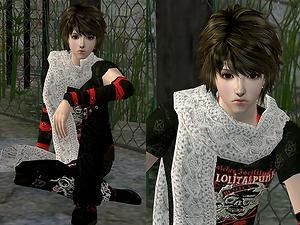
-Sizz- New mesh hair 'Hanui'
From Mod The Sims. By sizz. Download here.
Hi! Today. ^^
*About this hair*
* For all ages
* 10 colors
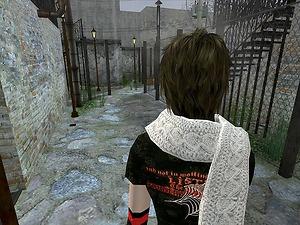
These clothes are by me and my friend. Please don't ask me where are to download. I will upload only my creation soon.(scarf & anorak )
notice
- Recolors and retextures/alphaEdit is allowed but please link back to my post for meshes.
- Do not include my meshes in your new 'Sims2Pack'and you recolor zip files.
have fun using it.
Polygon Counts:
faces=3932 Vertices=2850
Additional Credits:
Thanks to Milkshape, Wes h's unimesh plugins & SimPE.


Hi! Today. ^^
*About this hair*
* For all ages
* 10 colors
These clothes are by me and my friend. Please don't ask me where are to download. I will upload only my creation soon.(scarf & anorak )
notice - Recolors and retextures/alphaEdit is allowed but please link back to my post for meshes.
- Do not include my meshes in your new 'Sims2Pack'and you recolor zip files.
have fun using it.
Polygon Counts:
faces=3932 Vertices=2850
Additional Credits:
Thanks to Milkshape, Wes h's unimesh plugins & SimPE.
Friday, November 8, 2013
Zombie Jill's First Tumbler Upload
From Zombie Jill's Simbler. Download here.
My first Tumblr upload…! Exciting!
I come bearing some simple dress recolors for your adult ladies on a mesh by Trapping. The dress comes in 6 shades, and features black tights and wedgebooties , and short, mid-sleeved dresses with sheer sleeves and upper chest.
Files are compressed, and the mesh by Trapping is included, as well as images and my readme. The files are labelled according to thedress
color, so you can delete the ones you aren’t interested in! The
textures aren’t perfect, but I did what I can and they’re darn cute
either way!


My first Tumblr upload…! Exciting!
I come bearing some simple dress recolors for your adult ladies on a mesh by Trapping. The dress comes in 6 shades, and features black tights and wedge
Files are compressed, and the mesh by Trapping is included, as well as images and my readme. The files are labelled according to the
Saturday, October 5, 2013
Punkish Outfit 4 Adult Females
From Mod The Sims. By roshimitzu. Download here.
I bring to you one outfit today. Its sorta Punkish I think.
ConverseHighTops
Skull Arm Warmer.
Black
Plaid Skirt with Silver Belt and
HellCatPunks Teeshirt.
No mesh is needed. It uses the nightgown mesh for Afs.
It also shows up for your Young Adults.


I bring to you one outfit today. Its sorta Punkish I think.
ConverseHighTops
Skull Arm Warmer.
Black
HellCatPunks Teeshirt.
No mesh is needed. It uses the nightgown mesh for Afs.
It also shows up for your Young Adults.
Hair from RaonJenaSims2
Friday, September 27, 2013
Functional Warrior Sword
From Mod The Sims. By JohnBrehaut1. Download here.
Hello Everyone!!
After six months of work, I have finally finished the sword. This
is my first hacked object, that I have ever made. In the .rar file,
there is 3 files, 1 is the sword, 1 is the stand and the last one is a
social object. You need all 3 objects in your game for everything to
work properly.
This
is my first hacked object, that I have ever made. In the .rar file,
there is 3 files, 1 is the sword, 1 is the stand and the last one is a
social object. You need all 3 objects in your game for everything to
work properly.
UPDATE!!
17-1-2007 : After some people requesting it, I made it so the "Demonstrate Skills" interaction now adds body skillpoints. Your sim will gain them alot faster than usual, 1 and a bit skill points each time they do the interaction. See post in thread for a picture of it. POST
Mesh Details:
Sword Stand: 1856/1995 (f/v)
Sword: 1562/1302 (f/v)
Interactions
Sword Stand:
Sword:
Known Issues:
Game Compatability:
These objects, require atleast 1 expansion pack for the sword to go in the hand. It does not matter which expansion you have.
They will also not replace any of your game files.
The stand can be found under Miscellanious/ Miscellanious.
The animations only work for adult.
Credits:
Katy_76: Katy first started helping me to learn some of the basics of coding. She was the one who started me off at this, She was so nice and even sent pictures on how to do. She is one of the many great talents, who spared time to help me. So thank you katy !!
Cokenasmile: Coke helped me with checking error's in the sword, she also tought me how to make custom animations that dont overwrite the maxis ones.
HystericalParoxysm: HP helped me with finding much needed and useful animations. And for offering advice on how to make a sim die.
Hunter240X He also found some great animations that i could use.
Jasana_BugBreeder: For showing me how to make it show where it is correctly linking.
Echo: The biggest thanks would have to go her, she has been helping me with alot for this sword, without her, it wouldn't even be half finished. She helped with with making the sword stay in the hand after the interaction was finished. She corrected some of the codes i did which were wrong. She helped me with the commit suicide interaction, by telling me how to set it up. She also taught me the importance of Guardian bhav's. She also helped me majorly with the Kill a Sim interaction.
Smonaff: For fixing the Kill a Sim interaction for me, I wouldn't have been able to fix it. Also thank you for telling me how to make the Fight a Sim function work with the Kill a Sim interaction.
All these people took the time to help me when i was struggling, so a big thank you to you all !! :D
Terms & Conditions:
Recolouring: You may recolour the object, but you cannot include the mesh and you must link back to the thread.
Cloning: You may clone this object, as long as you ONLY replace the mesh of it, as in dont edit the code. If you do clone, it Link back to this thread.
Coding: You may go through the coding of this object and see how it works, but please don't just copy it.
Houses : You may include these in lots, as long as you link to this thread and that you dont upload it to the exchange!!
Paysites: You may not upload any clones, recolours, coding or houses with my content in them, to be uploaded to a paysite. If the site has a free area, you MUST post it in there, not a pay area!!!
If you need any other information, ask it and i will find the awnser.


Hello Everyone!!
After six months of work, I have finally finished the sword.
This
is my first hacked object, that I have ever made. In the .rar file,
there is 3 files, 1 is the sword, 1 is the stand and the last one is a
social object. You need all 3 objects in your game for everything to
work properly. UPDATE!!
17-1-2007 : After some people requesting it, I made it so the "Demonstrate Skills" interaction now adds body skillpoints. Your sim will gain them alot faster than usual, 1 and a bit skill points each time they do the interaction.
See post in thread for a picture of it. POST Mesh Details:
Sword Stand: 1856/1995 (f/v)
Sword: 1562/1302 (f/v)
Interactions
Sword Stand:
- "Draw Sword" - Your sim will walk to the stand and pick the sword up. The texture on the stand will change to make it look like the sword has been taken out. (NOTE: It will stay in your sim's hand until you use the "Put Away" interaction on the stand, or the "Drop" interaction on the sword.)
- "Put Away" - Your Sim will walk to the stand and put the sword away. The texture on the stand will change to make it look like the sword has been put back.
- "View" - Just the same as the normal maxis "View" interaction.
Sword:
- "Pick Up" - The sim will walk over to the sword and pick it up. If the sword isn't in the hand of the sim, this option will appear.
- "Drop" - The sim will drop the sword on the ground. This option will only appear when the sword is in the hand.
- "Demonstrate Skills" - Your sim will swing the sword around, aswell as do some kicks and punches. After the routine is finished, they bow.This option will only appear when the sword is in the hand. See the Update area, for an update on this interaction.
- "Fight a Sim" - Both the Sim with the sword and the selected sim will fight. They will stab, punch, kick and slash each other. Once they have finished, your sims fun will go up by a quarter.This option will only appear when the sword is in the hand.
- "Commit Suicide" - The Sim will perform a Custom animation (it may not actually go into the sim) where they will put the sword into them. They will throw up, then die.This option will only appear when the sword is in the hand.
- "Kill a Sim" - The sims selected will do exactly the same as the "Fight a Sim" interaction, but the sim who was selected, will die. It has a custom animation, but is a little off from stabbing the sim.This option will only appear when the sword is in the hand.
Known Issues:
- "Sword Placement in hand" - Sometimes, if something happens to the sim, the sword is moved out further from the hand. To fix this, you can either delete the sword from Buy mode, or put the sword back in the stand, then pull it out again.
- "Strange Pose" - Sometimes, when your sim commit's suicide, the sim may be stuck in a pose next to the stand. To fix this, you can either let the sim die by the grim reaper, or save them from the reaper.
- "Jump Bug"
- You may experience a bug with the sword or stand, where the sim may
teleport from one place to another then instantly back. Currently i dont
know what is causing it, so i can't fix it.

Game Compatability:
These objects, require atleast 1 expansion pack for the sword to go in the hand. It does not matter which expansion you have.
They will also not replace any of your game files.
The stand can be found under Miscellanious/ Miscellanious.
The animations only work for adult.
Credits:
Katy_76: Katy first started helping me to learn some of the basics of coding. She was the one who started me off at this, She was so nice and even sent pictures on how to do. She is one of the many great talents, who spared time to help me. So thank you katy !!
Cokenasmile: Coke helped me with checking error's in the sword, she also tought me how to make custom animations that dont overwrite the maxis ones.
HystericalParoxysm: HP helped me with finding much needed and useful animations. And for offering advice on how to make a sim die.
Hunter240X He also found some great animations that i could use.
Jasana_BugBreeder: For showing me how to make it show where it is correctly linking.
Echo: The biggest thanks would have to go her, she has been helping me with alot for this sword, without her, it wouldn't even be half finished. She helped with with making the sword stay in the hand after the interaction was finished. She corrected some of the codes i did which were wrong. She helped me with the commit suicide interaction, by telling me how to set it up. She also taught me the importance of Guardian bhav's. She also helped me majorly with the Kill a Sim interaction.
Smonaff: For fixing the Kill a Sim interaction for me, I wouldn't have been able to fix it. Also thank you for telling me how to make the Fight a Sim function work with the Kill a Sim interaction.
All these people took the time to help me when i was struggling, so a big thank you to you all !! :D
Terms & Conditions:
Recolouring: You may recolour the object, but you cannot include the mesh and you must link back to the thread.
Cloning: You may clone this object, as long as you ONLY replace the mesh of it, as in dont edit the code. If you do clone, it Link back to this thread.
Coding: You may go through the coding of this object and see how it works, but please don't just copy it.
Paysites: You may not upload any clones, recolours, coding or houses with my content in them, to be uploaded to a paysite. If the site has a free area, you MUST post it in there, not a pay area!!!
If you need any other information, ask it and i will find the awnser.
Subscribe to:
Posts (Atom)